
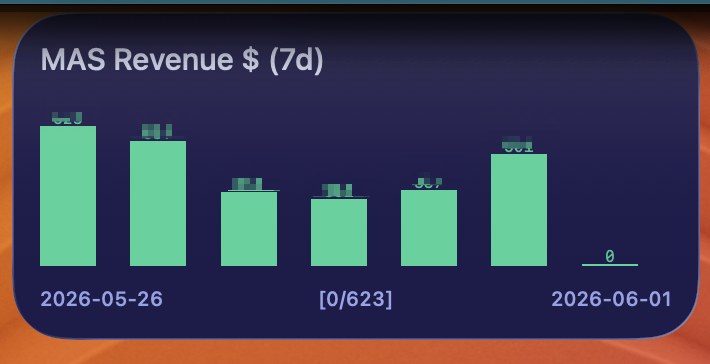
Track Mac App Store downloads and revenue from AppFigures and push them to three Terminal Widget targets: a daily table and two sparkline charts.
Requirements
- Terminal Widget (
terminal-widgetCLI) - AppFigures account with your app(s) connected
curlandjq(brew install jq)
1. Create an AppFigures API token
- Log in at appfigures.com.
- Open Account → API → Keys (or go directly to appfigures.com/developers/keys).
- Create a Personal Access Token with at least the
private:readscope. - Copy the token (it starts with
pat_). Store it only in your local config file, not in the script.
Optional — limit to specific apps: On an AppFigures product page, the numeric product ID appears in the URL or product details. Comma-separate IDs if you track multiple apps but want the widget to show only some of them.
2. Create dashboard.env
Create a config file that the script loads automatically:
mkdir -p ~/.config/terminal-widget
chmod 700 ~/.config/terminal-widget
Create ~/.config/terminal-widget/dashboard.env:
# Required: AppFigures Personal Access Token (private:read)
export APPFIGURES_ACCESS_TOKEN='pat_your_token_here'

# Optional: comma-separated product IDs (omit to include all products)
# export APPFIGURES_PRODUCT_IDS='123456,789012'

# Optional: widget target names (must match targets in Terminal Widget)
# export APPFIGURES_TABLE_TARGET='appfigures-table'
# export APPFIGURES_DL_CHART_TARGET='appfigures-downloads'
# export APPFIGURES_REV_CHART_TARGET='appfigures-revenue'

# Optional: how many days to show
# export APPFIGURES_TABLE_DAYS='7'
# export APPFIGURES_CHART_DAYS='14'

# Optional: label shown on the table widget
# export APPFIGURES_TABLE_LABEL='App Store Sales'

# Optional: path to terminal-widget if not on PATH
# export TERMINAL_WIDGET='/opt/homebrew/bin/terminal-widget'

# Optional: force a fresh API fetch (normally caches once per day)
# export APPFIGURES_FORCE_REFRESH='1'
Lock down permissions:
chmod 600 ~/.config/terminal-widget/dashboard.env
Alternate config path: set DASHBOARD_ENV=/path/to/your.env before running the script.
3. Add widget targets in Terminal Widget
Create three targets (names must match your env vars, or use the defaults below):
| Target ID | Type | Purpose |
|---|---|---|
appfigures-table |
Table | Last N days: Date, Downloads, Revenue |
appfigures-downloads |
Chart (sparkline) | Download trend |
appfigures-revenue |
Chart (sparkline) | Revenue trend ($) |
4. Install the script
Save the script below as something like ~/bin/appfigures-widgets.sh, then:
chmod +x ~/bin/appfigures-widgets.sh
Run once manually to verify:
~/bin/appfigures-widgets.sh
Cache files go to ~/.cache/terminal-widget/ (override with WIDGET_CACHE_DIR).
5. Schedule daily updates
AppFigures data usually lags by a day; the script ends on yesterday and refetches if yesterday still shows zeros. Running once in the morning is enough.
cron example (8:00 AM daily):
0 8 * * * /Users/you/bin/appfigures-widgets.sh >>/tmp/appfigures-widgets.log 2>&1
launchd is also fine if you prefer macOS-native scheduling.
Environment variables reference
| Variable | Required | Default | Description |
|---|---|---|---|
APPFIGURES_ACCESS_TOKEN |
Yes | — | Personal Access Token from AppFigures (pat_...) |
APPFIGURES_PRODUCT_IDS |
No | all products | Comma-separated numeric product IDs |
APPFIGURES_TABLE_TARGET |
No | appfigures-table |
Terminal Widget target for the table |
APPFIGURES_DL_CHART_TARGET |
No | appfigures-downloads |
Target for download sparkline |
APPFIGURES_REV_CHART_TARGET |
No | appfigures-revenue |
Target for revenue sparkline |
APPFIGURES_TABLE_DAYS |
No | 7 |
Rows in the table |
APPFIGURES_CHART_DAYS |
No | 14 |
Days in each sparkline |
APPFIGURES_TABLE_LABEL |
No | App Store Sales |
Title on the table widget |
APPFIGURES_FORCE_REFRESH |
No | 0 |
Set to 1 to bypass daily cache |
DASHBOARD_ENV |
No | ~/.config/terminal-widget/dashboard.env |
Path to config file |
WIDGET_CACHE_DIR |
No | ~/.cache/terminal-widget |
Cache directory |
TERMINAL_WIDGET |
No | terminal-widget |
Path to the CLI |
Troubleshooting
| Symptom | Likely cause |
|---|---|
APPFIGURES_ACCESS_TOKEN not set |
Missing or wrong path to dashboard.env |
API request failed |
Invalid/expired token, wrong scope, or network issue |
unexpected API response |
Inspect ~/.cache/terminal-widget/appfigures-sales.json; AppFigures may have changed response shape |
Yesterday shows 0 / $0 |
Normal early in the day; script refetches until yesterday has data |
| Wrong apps in totals | Set APPFIGURES_PRODUCT_IDS to your product ID(s) |