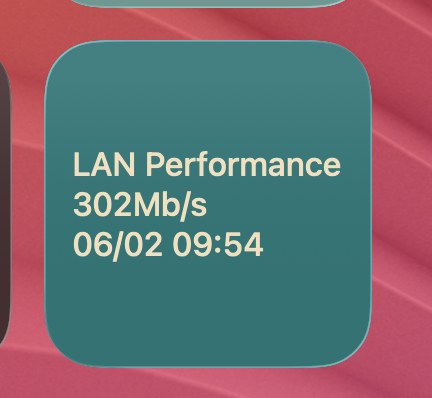
LAN Performance widget screenshot

Script

LAN Performance

by Brett Terpstra

This recipe runs a quick LAN throughput test with iperf3, updates a TerminalWidget target, and also prints the measured Mbps to STDOUT.

It is designed for a Synology host running iperf3 (default host alias: syn), but it also works on other Linux/Unix systems with minimal changes to host and binary paths.

Script path: - ~/bin/widget-network-perf.sh

1) Requirements

Install and verify: - ssh access to the remote host alias (default: syn) - iperf3 on the remote host at /usr/local/bin/iperf3 (this path is common on Synology; adjust on other systems) - local client binary iperf3-darwin in PATH - terminal-widget CLI in PATH

Quick checks:

command -v ssh
command -v iperf3-darwin
command -v terminal-widget
ssh syn 'command -v /usr/local/bin/iperf3'

2) Make It Executable

chmod +x ~/scripts/widget-network-perf.sh

3) Configure Variables

Open the script and edit the variables at the top if needed: - SSH_HOST - IPERF_SERVER_BIN - IPERF_CLIENT_BIN - IPERF_CLIENT_TARGET - REMOTE_SERVER_LOG - WIDGET_TARGET - WIDGET_TITLE - WIDGET_BG - WIDGET_FG

This is intentionally grouped at the top so sharing/customization is easy.

4) Run Manually

~/scripts/widget-network-perf.sh

Expected behavior: - Starts a one-shot iperf3 server remotely - Runs local iperf client against IPERF_CLIENT_TARGET - Updates widget target network_perf with multiline text: - LAN Performance - <mbps>Mb/s - timestamp (%m/%d %H:%M) - Prints raw Mbps value to STDOUT

5) Use As a TerminalWidget Recipe

Use your existing TerminalWidget recipe mechanism and set the command to:

~/scripts/widget-network-perf.sh

Recommended: - Refresh interval: 5-15 minutes for a stable signal - Keep widget target as network_perf unless you want a different widget ID

6) Troubleshooting

If the widget does not update: - Confirm terminal-widget is installed and in PATH - Run script directly in Terminal to see STDERR output - Confirm remote host alias resolves and allows SSH

If throughput cannot be parsed: - iperf output format may differ; run:

iperf3-darwin -c Cyberzerk.local
  • verify output includes Mbits/sec on sender or receiver summary lines

Script (widget-network-perf.sh)

#!/usr/bin/env bash

# Editable settings for sharing/reuse
SSH_HOST="syn"
IPERF_SERVER_BIN="/usr/local/bin/iperf3"
IPERF_CLIENT_BIN="iperf3-darwin"
IPERF_CLIENT_TARGET="Cyberzerk.local"
REMOTE_SERVER_LOG="/tmp/iperf3-server.log"

WIDGET_TARGET="network_perf"
WIDGET_TITLE="LAN Performance"
WIDGET_BG="rgba(18, 116, 117, 1.00)"
WIDGET_FG="rgba(245, 223, 187, 1.00)"

remote_pid="$(ssh "$SSH_HOST" "nohup $IPERF_SERVER_BIN -s -1 >$REMOTE_SERVER_LOG 2>&1 & echo \\$!")"
ssh_status=$?

if [ "$ssh_status" -ne 0 ]; then
	echo "Failed to start remote iperf3 server on $SSH_HOST" >&2
	exit 1
fi

if [ -z "$remote_pid" ]; then
	echo "Remote iperf3 server PID was not returned" >&2
	exit 1
fi

sleep 1

iperf_output="$($IPERF_CLIENT_BIN -c "$IPERF_CLIENT_TARGET" 2>&1)"
iperf_status=$?

ssh "$SSH_HOST" "kill $remote_pid" >/dev/null 2>&1 || true

if [ "$iperf_status" -ne 0 ]; then
	echo "iperf3 client command failed" >&2
	printf '%s\n' "$iperf_output" >&2
	exit 1
fi

mbps="$(printf '%s\n' "$iperf_output" | awk '/sender$/ {for (i = 1; i <= NF; i++) if ($i == "Mbits/sec") {print $(i - 1); exit}}')"

if [ -z "$mbps" ]; then
	mbps="$(printf '%s\n' "$iperf_output" | awk '/receiver$/ {for (i = 1; i <= NF; i++) if ($i == "Mbits/sec") {print $(i - 1); exit}}')"
fi

if [ -z "$mbps" ]; then
	echo "Could not parse total Mbits/sec from iperf output" >&2
	printf '%s\n' "$iperf_output" >&2
	exit 1
fi

printf '%s\n%sMb/s\n%s\n' "$WIDGET_TITLE" "$mbps" "$(date '+%m/%d %H:%M')" |
	terminal-widget --target "$WIDGET_TARGET" --text - --fit-text --bg "$WIDGET_BG" --fg "$WIDGET_FG" >/dev/null 2>&1 || true

printf '%s\n' "$mbps"

Download script

Running in the background with launchd

Suggested interval: 1 hour (StartInterval = 3600 seconds).

Save the script from this recipe to ~/bin/lan-performance.sh, then create a Launch Agent plist:

<?xml version="1.0" encoding="UTF-8"?>
<!DOCTYPE plist PUBLIC "-//Apple//DTD PLIST 1.0//EN" "http://www.apple.com/DTDs/PropertyList-1.0.dtd">
<plist version="1.0">
<dict>
  <key>Label</key>
  <string>com.terminalwidget.lan-performance</string>
  <key>ProgramArguments</key>
  <array>
    <string>/bin/bash</string>
    <string>~/bin/lan-performance.sh</string>
  </array>
  <key>RunAtLoad</key>
  <true/>
  <key>StartInterval</key>
  <integer>3600</integer>
  <key>StandardOutPath</key>
  <string>/tmp/com.terminalwidget.lan-performance.log</string>
  <key>StandardErrorPath</key>
  <string>/tmp/com.terminalwidget.lan-performance.err</string>
</dict>
</plist>

From Terminal:

mkdir -p ~/bin ~/Library/LaunchAgents
# Save your script to ~/bin/lan-performance.sh
cat > ~/Library/LaunchAgents/com.terminalwidget.lan-performance.plist <<'EOF'
<?xml version="1.0" encoding="UTF-8"?>
<!DOCTYPE plist PUBLIC "-//Apple//DTD PLIST 1.0//EN" "http://www.apple.com/DTDs/PropertyList-1.0.dtd">
<plist version="1.0">
<dict>
  <key>Label</key>
  <string>com.terminalwidget.lan-performance</string>
  <key>ProgramArguments</key>
  <array>
    <string>/bin/bash</string>
    <string>~/bin/lan-performance.sh</string>
  </array>
  <key>RunAtLoad</key>
  <true/>
  <key>StartInterval</key>
  <integer>3600</integer>
  <key>StandardOutPath</key>
  <string>/tmp/com.terminalwidget.lan-performance.log</string>
  <key>StandardErrorPath</key>
  <string>/tmp/com.terminalwidget.lan-performance.err</string>
</dict>
</plist>
EOF
launchctl bootstrap "gui/$(id -u)" ~/Library/LaunchAgents/com.terminalwidget.lan-performance.plist

For a GUI editor and troubleshooting, see LaunchControl from soma-zone.

← All recipes