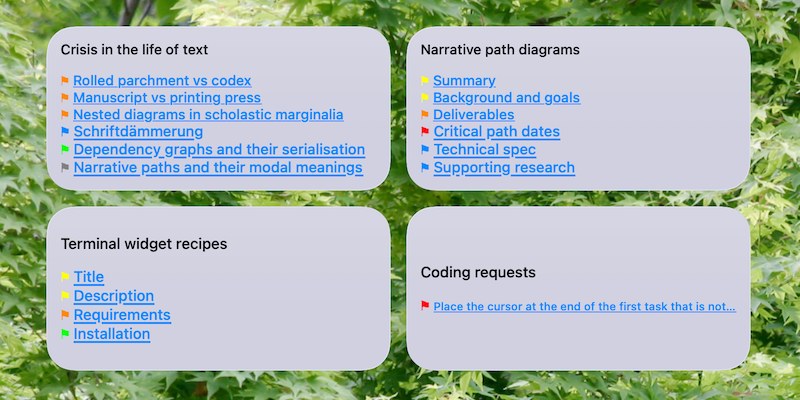
Links to flagged lines in a Hogbay Software Bike 2.0 outline
by Rob Trew
Hogbay Software’s Bike 2.0 Outliner (build 294+) lets you flag any row (choosing from 7 flag colors, defaulting to red), via (⇧⌘A) Format > Row Attributes...
This TerminalWidget shows hyperlinks to any flagged rows in a Bike outline, using the .bike or .biked filename as the widget title, and prefixing each link with its colored flag.
Requirements
Flagged lines in a Bike.app outline file
The file doesn’t have to be open in Bike.app
It must be in .bike or .biked format – this script relies on X/HTML structure for fast parsing, and will not work with files saved in .md or .txt format.
Terminal widget with target name matching the file name (minus extension)
Create a new TerminalWidget with the size you prefer
Ctrl-click on the new widget, and choose Edit Terminal Widget...
Set the target name to the Bike outline filename, dropping the .bike[d] extension
Command line test
Ensure that flaggedBikeLines.sh is executable, with chmod +x flaggedBikeLines.sh
Apply it to the full path of a Bike outline file (.bike or .biked) for which there is a TerminalWidget with a target name matching its file name (minus extension)
Update on file change
Create a Hazel.app rule for a folder containing a .bike or .biked file for which you have created a TerminalWidget
Add a rule which apples the script to any newly-changed .bike or .biked file(s) in the folder.
If
all
of the following conditions are met
Date Last Modified
is after
Date Last Matched
If
any
of the following conditions are met for
the current file or folder
Extension
is
bike
Extension
is
biked
Do the following to the matched file or folder
Run shell script
flaggedBikeLines.sh
Script (flaggedBikeLines.sh)
#!/bin/zsh# Ver 0.6# Links to flagged lines in a Hogbay Bike 2.0 (294+) .bike outline.# Output to a TerminalWidget with a target name which matches# the filename stem of the .bike (or .biked) filepath # which is passed to the script.# e.g. for `~/Desktop/Project\ Notes.bike` we use# "Project Notes" as the widget identifier.# ---------# In the case of a .biked bundle containing attachments, the# xhtml source is expected in a `text.bike` file in the bundle.localbike_xml_path="$1"[["$1"== *.biked ]]&&bike_xml_path="$1/text.bike"# A message for the case in which no `.bike` file is found at the path.if[[ ! -f "$bike_xml_path"]];thenecho"Error: .bike file not found: '$bike_xml_path'" >&2exit1fi# Otherwise, a filename header, followed by zero or more lines consisting of # MD links to flagged lines in the Bike outline, each prefixed by a colored flag # (color specified by the value of `data-flagged` in the given line){# As a header – the matched file name without its extensionprintf"%s\n\n""${1:t:r}"# jaq query (xml-capable jq) ( https://gedenkt.at/jaq/manual/ )# jaq can be installed from brew ( https://formulae.brew.sh/formula/jaq )
/opt/homebrew/bin/jaq -r --from xml ' def get_text: if type == "string" then . elif type == "object" then (.c[]? | get_text) else empty end; # ANSI codes for Bike flag colors { "orange": 208, "red": 196, "purple": 129, "blue": 33, "yellow": 226, "green": 46, "gray": 244 } as $color_map | # Unique identifier of the .bike document (used in Bike link urls) ( [.. | objects | select(.t == "ul" and (.a.id? != null)) | .a.id] | first ) as $rootid | # Rows of the .bike outline, paired with their zero-based indices (for line numbers) [.. | objects | select(.t == "li")] | to_entries[] | # ONLY LINES WITH a `data-flagged` ATTRIBUTE select(.value.a? | has("data-flagged")?) | # ANSI color code matching any `data-flagged` attribute value, # defaulting to red (code 196) for empty or unknown values. (.value.a["data-flagged"]) as $color_name | ($color_map[$color_name] // 196) as $color_code | # Plain text version of Bike outline row, with XML entity decoding # falling back to `alt` or `src` of img if text is empty ( ( [.value.c[]? | objects | select(.t == "p") | get_text] | join("") ) as $parsed_text | if $parsed_text != "" then $parsed_text else # Find the first img tag inside the p element and check its attributes (.a) ( [.value.c[]? | objects | select(.t == "p") | .. | objects | select(.t == "img") | .a] | first | if (.alt // "") != "" then .alt else .src end ) // "(Line \(.key + 1))" end ) as $label_text | # XML entity decoding and bracket substitution ( $label_text | gsub("""; "\"") | gsub("'"; "\u0027") | gsub(">"; ">") | gsub("<"; "<") | gsub("&"; "&") | gsub("\\["; "{") | gsub("\\]"; "}") ) as $text | # Unique persistentId of the row if it has one, # otherwise, its one-based row number. (if .value.a.id? != null then .value.a.id else "#\(.key + 1)" end) as $focus_path | # MD link to row, with flag prefix colored by ANSI escape sequence (using \u001b for ESC) "\u001b[38;5;\($color_code)m⚑\u001b[0m [\($text)](bike://\($rootid)/\($focus_path))" '"$bike_xml_path"}| /Applications/TerminalWidget.app/Contents/MacOS/TerminalWidget --target "${1:t:r}" --text - --bg d0d0e0