
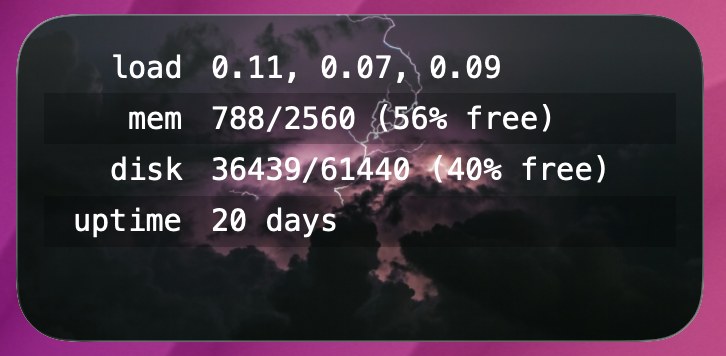
Show live load, memory, disk, and uptime from a remote server in a compact Terminal Widget table. The script SSHes in once, reads standard Linux host metrics, and updates a named target with --table (fit-text, centered layout).
Works with any Linux or Linux-like host you can reach over SSH—VPS, dedicated, cloud instance, or shared hosting with shell access (DreamHost, DigitalOcean, Linode, home lab, etc.). If you can ssh in without a password prompt, you can drive this widget. The remote side only needs common tools (/proc, free, df); no agent or extra software on the server.
Requirements
- Terminal Widget (
terminal-widgeton your PATH) - Passwordless SSH to the server (key-based auth; BatchMode)
- A widget whose Target name matches the script’s
TARGET(defaultserver-stats)
SSH setup
Pick one of these in the script’s # === CONFIG === block (redact before sharing):
Option A — SSH config alias (recommended)
In ~/.ssh/config:
Host myserver
  HostName your.example.com
  User youruser
  IdentityFile ~/.ssh/id_ed25519
Then in the script:
SSH_ALIAS="myserver"
# leave SSH_USER / SSH_HOST empty
Test: ssh myserver true should succeed with no password prompt.
Option B — User, host, and optional key
SSH_ALIAS=""
SSH_USER="youruser"
SSH_HOST="your.example.com"
SSH_KEY="~/.ssh/id_ed25519"   # optional; empty uses the agent / default keys
Also set:
TARGET="server-stats"   # must match Edit Widget → Target name
TW="/opt/homebrew/bin/terminal-widget"
What it shows
| Row | Value |
|---|---|
| load | 1 / 5 / 15-minute load averages |
| mem | used/total MB and % free (from available) |
| disk | used/total MB on $HOME and % free |
| uptime | days since boot |
Run / schedule
chmod +x ~/scripts/widget-server-stats.sh
~/scripts/widget-server-stats.sh
Refresh on a timer with LaunchAgent, cron, or Shortcuts. On SSH failure the script exits without wiping the last good widget state.
Notes
- Metrics come from
/procandfree(typical Linux). Other Unix variants may need small tweaks to the remote one-liner. - Keep secrets out of shared copies: only publish a config block with placeholders, never your real alias, user, or key path.