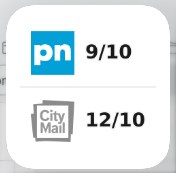
Checks whether there is any physical mail delivery to a Swedish postal code. It displays a company logo along with its next delivery date. If the delivery date is today, the logo is shown in color; otherwise, it is shown in grayscale.
Edit the postal code in the Shortcut to match your postal code, then create an automation that runs the Shortcut once a day, for example at 6:30 AM.
Example Launch Agent plist (runs /usr/bin/shortcuts run on the interval above):
<?xml version="1.0" encoding="UTF-8"?><!DOCTYPE plist PUBLIC "-//Apple//DTD PLIST 1.0//EN" "http://www.apple.com/DTDs/PropertyList-1.0.dtd"><plistversion="1.0"><dict><key>Label</key><string>com.terminalwidget.swedish-mail-checker</string><key>ProgramArguments</key><array><string>/usr/bin/shortcuts</string><string>run</string><string>SweMailChecker</string></array><key>RunAtLoad</key><true/><key>StartInterval</key><integer>86400</integer><key>StandardOutPath</key><string>/tmp/com.terminalwidget.swedish-mail-checker.log</string><key>StandardErrorPath</key><string>/tmp/com.terminalwidget.swedish-mail-checker.err</string></dict></plist>
launchd requires macOS and a logged-in user session. Logs are written to /tmp/com.terminalwidget.swedish-mail-checker.log and /tmp/com.terminalwidget.swedish-mail-checker.err.
For a GUI editor and troubleshooting, see LaunchControl from soma-zone.
3. Shortcuts automations (macOS, iOS, and iPadOS)
Without launchd, use a personal automation in Shortcuts.app:
Open Shortcuts → Automation (or the Automations tab).
Create a Personal Automation.
Choose a trigger that matches your interval—for example Time of Day (daily or hourly repeats) or another trigger that fits this recipe.
Add the Run Shortcut action and select SweMailChecker.
Turn off Ask Before Running (or enable Run Immediately on iOS/iPadOS) so updates happen unattended.
On iPhone and iPad, background timing is handled by Shortcuts automations—not launchd. Some triggers still require confirmation unless Run Immediately is enabled.
4. Home app (optional)
If you use a Home hub (HomePod, Apple TV, or iPad as home hub), you can add a Home automation that runs this Shortcut on a time-based or accessory trigger. In the Home app, create an automation → add a Run Shortcut action → choose SweMailChecker.