
Show current Time Machine state, including percent complete while a backup is running. Run on an interval with a launchd user agent so the widget stays current.
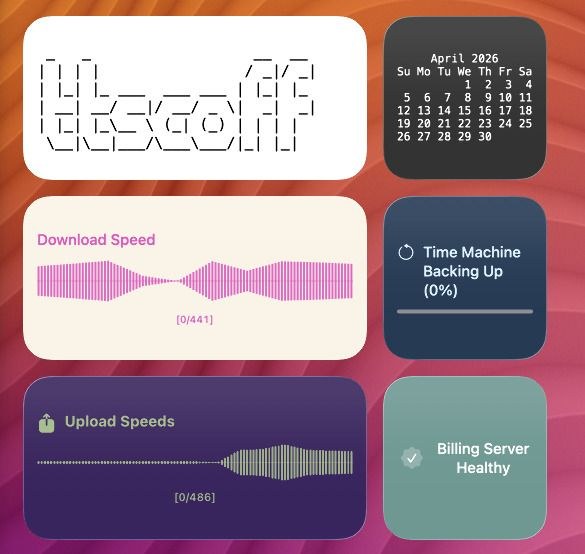
Script
Time Machine Status and Backup Progress
Script (timemachine-status.sh)
#!/usr/bin/env bash
set -euo pipefail

status_raw="$(tmutil status 2>/dev/null || true)"

if grep -q "Running = 1;" <<<"$status_raw"; then
  percent="$(
    awk '
      /Percent =/ {
        gsub(/;/, "", $3)
        p = $3 + 0
        v = int((p * 100) + 0.5)
        if (v < 0) v = 0
        if (v > 100) v = 100
        print v
        found = 1
      }
      END {
        if (!found) print 0
      }
    ' <<<"$status_raw"
  )"
  percent="${percent:-0}"

  terminal-widget \
    --target timemachine \
    --icon arrow.trianglehead.counterclockwise \
    --text "Time Machine Backing Up (${percent}%)" \
    --progress "$percent" \
    --foreground "#d9f2ff" \
    --background "#1f3b56"
else
  terminal-widget \
    --target timemachine \
    --icon checkmark.arrow.trianglehead.clockwise \
    --text "Time Machine Idle" \
    --foreground "#d7ffe3" \
    --background "#244730"
fi
Running in the background with launchd
Suggested interval: 10 minutes (StartInterval = 600 seconds).
Save the script from this recipe to ~/bin/timemachine-status.sh, then create a Launch Agent plist:
<?xml version="1.0" encoding="UTF-8"?>
<!DOCTYPE plist PUBLIC "-//Apple//DTD PLIST 1.0//EN" "http://www.apple.com/DTDs/PropertyList-1.0.dtd">
<plist version="1.0">
<dict>
  <key>Label</key>
  <string>com.terminalwidget.timemachine-status</string>
  <key>ProgramArguments</key>
  <array>
    <string>/bin/bash</string>
    <string>~/bin/timemachine-status.sh</string>
  </array>
  <key>RunAtLoad</key>
  <true/>
  <key>StartInterval</key>
  <integer>600</integer>
  <key>StandardOutPath</key>
  <string>/tmp/com.terminalwidget.timemachine-status.log</string>
  <key>StandardErrorPath</key>
  <string>/tmp/com.terminalwidget.timemachine-status.err</string>
</dict>
</plist>
From Terminal:
mkdir -p ~/bin ~/Library/LaunchAgents
# Save your script to ~/bin/timemachine-status.sh
cat > ~/Library/LaunchAgents/com.terminalwidget.timemachine-status.plist <<'EOF'
<?xml version="1.0" encoding="UTF-8"?>
<!DOCTYPE plist PUBLIC "-//Apple//DTD PLIST 1.0//EN" "http://www.apple.com/DTDs/PropertyList-1.0.dtd">
<plist version="1.0">
<dict>
  <key>Label</key>
  <string>com.terminalwidget.timemachine-status</string>
  <key>ProgramArguments</key>
  <array>
    <string>/bin/bash</string>
    <string>~/bin/timemachine-status.sh</string>
  </array>
  <key>RunAtLoad</key>
  <true/>
  <key>StartInterval</key>
  <integer>600</integer>
  <key>StandardOutPath</key>
  <string>/tmp/com.terminalwidget.timemachine-status.log</string>
  <key>StandardErrorPath</key>
  <string>/tmp/com.terminalwidget.timemachine-status.err</string>
</dict>
</plist>
EOF
launchctl bootstrap "gui/$(id -u)" ~/Library/LaunchAgents/com.terminalwidget.timemachine-status.plist
For a GUI editor and troubleshooting, see LaunchControl from soma-zone.