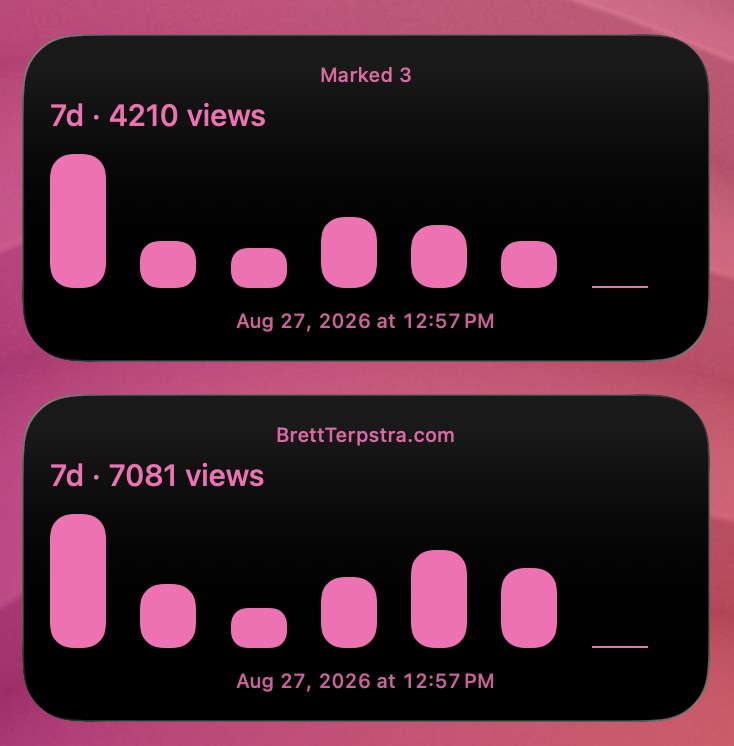
Display daily visitor stats from your Umami analytics instance directly on a TerminalWidget sparkline chart.
Supports both self-hosted Umami (using your username/password login) and Umami Cloud (using an API key). You can configure the widget to display either total page views or unique visitors, complete with a rounded-bar sparkline and a direct tap action to open your analytics dashboard.
Requirements
TerminalWidget app installed and terminal-widget accessible on your PATH (typically /opt/homebrew/bin/terminal-widget or /usr/local/bin/terminal-widget)
curl and python3 (pre-installed on macOS)
An active Umami account (self-hosted or Umami Cloud)
A TerminalWidget widget added to your desktop or Notification Center with a Target name matching the TARGET variable in the script (default: umami-stats)
Configuration
Open the script in your favorite text editor and edit the # === CONFIGURATION === section at the top:
1. Widget and Site Settings
TARGET: The target name configured on your TerminalWidget (e.g. umami-stats or umami-blog).
SITE_NAME: The title to display at the top of the widget (e.g. My Blog).
WEBSITE_ID: Your website’s UUID found in your Umami dashboard settings or URL.
METRIC: Set to "views" for total pageviews or "visitors" for unique sessions.
DAYS: Number of days to include in the chart history (default: 7).
TIMEZONE: Timezone for daily bucketing (e.g. America/Chicago, America/New_York, UTC).
DASHBOARD_URL: Optional URL to open when clicking or tapping the widget (e.g. https://analytics.example.com/websites/YOUR_WEBSITE_ID).
2. Authentication
Choose one of the two authentication methods:
Option A — Self-Hosted Umami (Username & Password)
Generate an API key from Settings → API Keys in your Umami Cloud account.
3. Styling
FG: Foreground hex color for the title, text, and chart bars (default: ff69b4).
BG: Background hex color (default: 000000).
BAR_RADIUS: Corner rounding percentage for sparkline bars (default: 40).
Usage
Save the script to your scripts directory (for example ~/bin/widget-umami-stats.sh).
Make it executable:
chmod +x ~/bin/widget-umami-stats.sh
Run the script manually to test your configuration:
~/bin/widget-umami-stats.sh
If successful, your target widget will refresh with a sparkline chart and a summary line like 7d · 1,420 views or 7d · 850 visitors.
Multiple Websites
To track multiple websites, make separate copies of the script (e.g., ~/bin/umami-blog.sh, ~/bin/umami-shop.sh). In each copy, set the appropriate TARGET, SITE_NAME, and WEBSITE_ID to target distinct widgets.
Running in the Background
You can automate updates on an interval (e.g., every 15 or 30 minutes) using launchd or cron. See the launchd instructions below for details on running in the background.
Script (umami.sh)
#!/usr/bin/env bash# Refresh a TerminalWidget sparkline chart with 7-day Umami stats.# Supports self-hosted Umami (user/pass) and Umami Cloud (API key).## To track multiple websites, make a copy of this script for each site# and configure distinct TARGET and WEBSITE_ID values.set -euo pipefail
# ==============================================================================# CONFIGURATION (Edit this block before running)# ==============================================================================# Widget target name in TerminalWidget (must match "Target name" in widget settings)TARGET="umami-stats"# Display title on the widgetSITE_NAME="My Website"# Website ID from Umami (UUID found in website settings / URL)WEBSITE_ID="xxxxxxxx-xxxx-xxxx-xxxx-xxxxxxxxxxxx"# Metric to display: "views" (total pageviews) or "visitors" (unique sessions)METRIC="views"# Number of days to include in the sparkline chartDAYS=7# Timezone for date bucketing (e.g., "America/Chicago", "America/New_York", "UTC")TIMEZONE="America/Chicago"# Umami Base URL:# - Self-hosted: "https://analytics.example.com"# - Umami Cloud: "https://api.umami.is/v1" (or "https://cloud.umami.is")UMAMI_BASE="https://analytics.example.com"# --- AUTHENTICATION (Choose Option 1 OR Option 2) ---# Option 1: Umami Cloud or API Key (Leave empty if using username/password)UMAMI_API_KEY=""# Option 2: Self-hosted Username & Password (Used only if UMAMI_API_KEY is empty)UMAMI_USER=""UMAMI_PASS=""# --- OPTIONAL STYLING & ACTIONS ---# Tap/click action: opens website dashboard in browser (leave empty to disable)# Example: "https://analytics.example.com/websites/xxxxxxxx-xxxx-xxxx-xxxx-xxxxxxxxxxxx"DASHBOARD_URL=""# Widget colors and stylingFG="ff69b4"# Chart & text color (hex)BG="000000"# Background color (hex)BAR_RADIUS="40"# Rounded sparkline bars (0 for sharp edges)# Path to the terminal-widget binaryTW="/opt/homebrew/bin/terminal-widget"# ==============================================================================# END CONFIGURATION# ==============================================================================
die(){echo"widget-umami-stats: $*" >&2exit1}# Preflight checkscommand -v "$TW" >/dev/null 2>&1|| die "terminal-widget CLI not found at $TW"command -v curl >/dev/null 2>&1|| die "curl is required"command -v python3 >/dev/null 2>&1|| die "python3 is required"[[ -n "$TARGET"]]|| die "TARGET cannot be empty"[[ -n "$WEBSITE_ID"&&"$WEBSITE_ID" !="xxxxxxxx-xxxx-xxxx-xxxx-xxxxxxxxxxxx"]]\|| die "Please set a valid WEBSITE_ID in the configuration block"# Normalize metric selectioncase"${METRIC,,}"in
visitor|visitors|session|sessions|unique)METRIC_KEY="sessions"LABEL_SINGULAR="visitor"LABEL_PLURAL="visitors";;
view|views|pageview|pageviews|*)METRIC_KEY="pageviews"LABEL_SINGULAR="view"LABEL_PLURAL="views";;esac# Determine authentication headerAUTH_HEADERS=()if[[ -n "$UMAMI_API_KEY"]];thenAUTH_HEADERS=(
-H "x-umami-api-key: ${UMAMI_API_KEY}"
-H "Authorization: Bearer ${UMAMI_API_KEY}")elseif[[ -z "$UMAMI_USER"|| -z "$UMAMI_PASS"]];then
die "Provide either UMAMI_API_KEY (for Cloud) or both UMAMI_USER and UMAMI_PASS (for self-hosted)"filogin_url="${UMAMI_BASE%/}/api/auth/login"login_payload="$(U="$UMAMI_USER"P="$UMAMI_PASS" python3 -c 'import json, osprint(json.dumps({"username": os.environ["U"], "password": os.environ["P"]}))')"login_response="$(
curl -fsS -X POST "$login_url"\
-H "Content-Type: application/json"\
-H "Accept: application/json"\
-d "$login_payload")"|| die "Authentication request failed at $login_url (check UMAMI_BASE and credentials)"TOKEN="$(python3 -c 'import json, sys; d=json.load(sys.stdin); print(d.get("token") or "")'<<<"$login_response")"[[ -n "$TOKEN"]]|| die "Login succeeded but returned no token"AUTH_HEADERS=(-H "Authorization: Bearer ${TOKEN}")fi# Time window calculation (milliseconds)END_MS=$(($(date +%s)*1000))START_MS=$(( END_MS - DAYS *24*60*60*1000))# Construct the pageviews API endpoint URLbase_clean="${UMAMI_BASE%/}"if[["$base_clean"=~ /v[0-9]+$ ||"$base_clean"=~ /api$ ]];thenapi_url="${base_clean}/websites/${WEBSITE_ID}/pageviews"elseapi_url="${base_clean}/api/websites/${WEBSITE_ID}/pageviews"fiquery_url="${api_url}?startAt=${START_MS}&endAt=${END_MS}&unit=day&timezone=${TIMEZONE}"# Fetch statisticshttp_response="$(
curl -sS -w "\n%{http_code}""$query_url"\
-H "Accept: application/json"\"${AUTH_HEADERS[@]}")"|| die "Failed to connect to Umami API at $query_url"http_code="${http_response##*$'\n'}"json_body="${http_response%$'\n'*}"if[["$http_code" !="200"]];then
die "Umami API returned HTTP $http_code: ${json_body:0:200}"fi[[ -n "${json_body//[[:space:]]/}"]]|| die "Empty response body from Umami API"# Parse JSON and compute continuous N-day series (fills missing days with 0)parsed="$(UMAMI_STATS_JSON="$json_body" python3 - "$START_MS""$END_MS""$DAYS""$METRIC_KEY"<<'PY'import json, os, sysfrom datetime import datetime, timezone, timedeltastart_ms, end_ms, days = map(int, sys.argv[1:4])metric_key = sys.argv[4]raw = os.environ.get("UMAMI_STATS_JSON", "")if not raw.strip(): raise SystemExit("Empty statistics payload")payload = json.loads(raw)rows = payload.get(metric_key) or []def parse_date(x): if isinstance(x, (int, float)): return datetime.fromtimestamp(x / 1000 if x > 1e11 else x, tz=timezone.utc).date() s = str(x).strip().replace("Z", "+00:00") if len(s) == 10 and s.count("-") == 2: try: return datetime.strptime(s, "%Y-%m-%d").date() except Exception: pass try: return datetime.fromisoformat(s).date() except Exception: pass for fmt in ("%Y-%m-%d %H:%M:%S", "%Y-%m-%d %H:%M:%S.%f", "%Y/%m/%d %H:%M:%S"): try: return datetime.strptime(s, fmt).date() except Exception: pass return Noneby_day = {}for row in rows: x = row.get("x") y = row.get("y") or 0 if x is None: continue day = parse_date(x) if day: by_day[day] = by_day.get(day, 0) + int(y)end_day = datetime.fromtimestamp(end_ms / 1000, tz=timezone.utc).date()start_day = end_day - timedelta(days=days - 1)values = []total = 0cur = start_daywhile cur <= end_day: v = int(by_day.get(cur, 0)) values.append(str(v)) total += v cur += timedelta(days=1)print("\t".join([" ".join(values), str(total)]))PY)"|| die "Failed to parse Umami statistics payload"chart_series="${parsed%%$'\t'*}"total_count="${parsed#*$'\t'}"label_unit="$LABEL_PLURAL"if[["$total_count" -eq 1]];thenlabel_unit="$LABEL_SINGULAR"fitext_summary="${DAYS}d · ${total_count}${label_unit}"# Build terminal-widget command argumentstw_cmd=("$TW"
--target "$TARGET"
--title "$SITE_NAME"
--title-color "$FG"
--text "$text_summary"
--chart "$chart_series"
--chart-format sparkline
--bar-radius "$BAR_RADIUS"
--fg "$FG"
--bg "$BG"
--timestamp
--base-zero
)if[[ -n "$DASHBOARD_URL"]];thentw_cmd+=(--action-kind open-url --action-value "$DASHBOARD_URL")fi# Update the widget"${tw_cmd[@]}"echo"widget-umami-stats: updated target '${TARGET}' with ${total_count}${label_unit} (${chart_series})"