
WEBALIZER-WIDGET.PY(1)
NAME
webalizer-widget.py — display Webalizer website statistics as graphs in TerminalWidget
SYNOPSIS
webalizer-widget.py [OPTIONS] WEBALIZER_URL
Examples:
webalizer-widget.py https://stats.example.org/webalizer/
webalizer-widget.py https://stats.example.org/webalizer/ \
    --view monthly \
    --months 12
webalizer-widget.py https://stats.example.org/webalizer/ \
    --username USERNAME \
    --password-file ~/.webalizer-password
DESCRIPTION
webalizer-widget.py reads statistics generated by Webalizer and displays them as graphical widgets using Brett Terpstra’s TerminalWidget. The script is intended to be reusable with any standard Webalizer installation. The only required argument is the base URL of the Webalizer report directory. For example:
https://stats.example.org/webalizer/
The script retrieves the Webalizer HTML reports, extracts traffic statistics, and passes the resulting data to the terminal-widget command-line utility.
Two principal views are available:
- daily
- Displays a rolling graph of daily statistics, normally covering the most recent 30 days.
- monthly
- Displays monthly totals from the Webalizer summary page, normally covering the most recent 12 months.
The default statistic is Visits, which generally provides a more useful indication of website activity than raw HTTP Hits. The widget is clickable and opens the corresponding Webalizer report in the default browser.
DEFAULTS
Unless otherwise specified, the script uses:
View:          daily
Metric:        visits
Daily period:  30 days
Monthly period: 12 months
Daily chart:   area
Monthly chart: bar
Daily target:  webstats
Monthly target: webstats-monthly
404 warning:   5%
DAILY VIEW
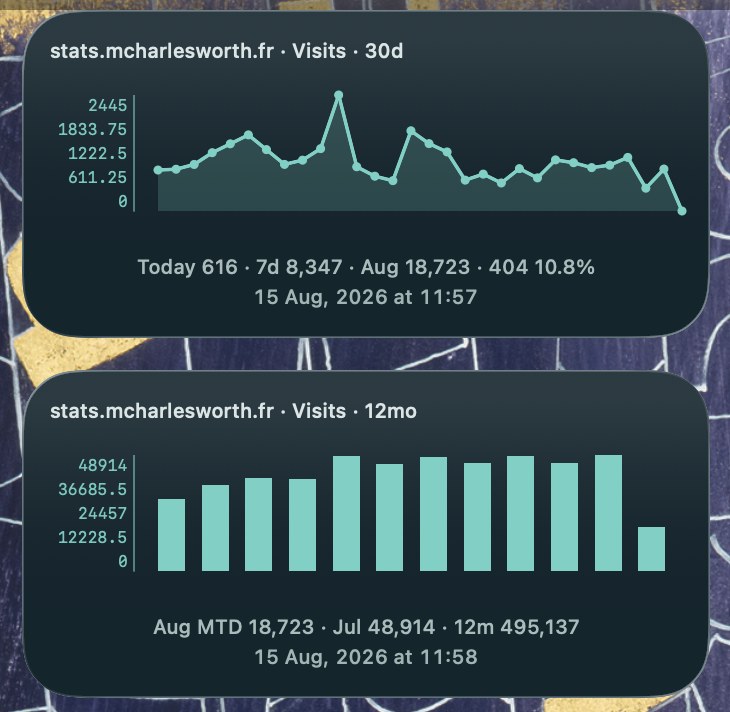
The default daily display graphs the most recent Webalizer daily Visit counts. The caption contains:
Today 245 · 7d 1,828 · Aug 3,827
If Webalizer has not yet generated statistics for the current day, the date of the most recent available report is shown instead:
14 Aug 245 · 7d 1,828 · Aug 3,827
If the percentage of HTTP 404 responses exceeds the configured warning threshold, the percentage is appended:
Today 245 · 7d 1,828 · Aug 3,827 · 404 8.4%
The graph automatically crosses month boundaries by retrieving the required usage_YYYYMM.html files.
MONTHLY VIEW
Monthly mode reads the main Webalizer summary page and graphs the monthly totals. For example:
webalizer-widget.py \
    https://stats.example.org/webalizer/ \
    --view monthly
A typical caption might be:
Aug MTD 3,827 · Jul 6,638 · 12m 68,421
The current month is identified as MTD (“month to date”) because its total is incomplete until the month has ended.
METRICS
The following Webalizer statistics may be graphed:
- visits
- Webalizer Visits. This is the default and usually the most useful general traffic statistic.
- pages
- Page requests recorded by Webalizer.
- hits
- All HTTP requests, including pages, images, stylesheets and other resources. Hits can be substantially higher than actual website usage.
- files
- Requests that resulted in a file being transferred.
- sites
- Unique hosts or sites recorded by Webalizer. This should not necessarily be interpreted as an exact count of individual human visitors.
- kbytes
- Amount of data transferred.
Select a metric with:
--metric METRIC
For example:
webalizer-widget.py \
    https://stats.example.org/webalizer/ \
    --metric pages
OPTIONS
--view {daily,monthly}
Select the type of graph.
--view daily
or:
--view monthly
Default:
daily
--metric METRIC
Select the Webalizer statistic to display. Valid values are:
visits
pages
hits
files
sites
kbytes
Default:
visits
--days NUMBER
Number of days displayed by the daily graph. For example:
--days 60
The permitted range is 7–128 days. Default:
30
--months NUMBER
Number of months displayed by the monthly graph. For example:
--months 24
The permitted range is 2–128 months. Default:
12
--target NAME
Specify the TerminalWidget target to update. For example:
--target website-stats
If omitted, the defaults are:
daily:    webstats
monthly:  webstats-monthly
This permits daily and monthly widgets to coexist.
--title TEXT
Override the automatically generated widget title. Normally the title is derived from the website name reported by Webalizer. Example:
--title "Fr Isaac SJ · Visits"
--chart-format FORMAT
Override the TerminalWidget chart format. For example:
--chart-format smooth
Daily mode defaults to:
area
Monthly mode defaults to:
bar
--warn-404 PERCENT
Set the percentage of HTTP 404 responses at which the daily widget adds a warning to its caption. For example:
--warn-404 10
Default:
5
To effectively disable the warning:
--warn-404 100
AUTHENTICATION
The script supports HTTP Basic Authentication for Webalizer reports protected by a username and password.
Credentials may be supplied using command-line arguments, environment variables, a password file, or .netrc.
Command-line credentials
webalizer-widget.py \
    https://stats.example.org/webalizer/ \
    --username matthew \
    --password 'secret-password'
This is convenient for testing but is not recommended for automated jobs because the password may be visible in the command line.
--username USERNAME
Specify the HTTP Basic Authentication username.
--password PASSWORD
Specify the HTTP Basic Authentication password.
--password-file FILE
Read the password from a file. For example:
webalizer-widget.py \
    https://stats.example.org/webalizer/ \
    --username matthew \
    --password-file ~/.webalizer-password
The password file should normally be restricted:
chmod 600 ~/.webalizer-password
.netrc
For unattended operation, including LaunchAgents, .netrc is usually the preferred method.
Example:
machine stats.example.org
    login matthew
    password secret-password
Secure the file with:
chmod 600 ~/.netrc
The script then automatically selects the credentials according to the hostname in the Webalizer URL:
webalizer-widget.py \
    https://stats.example.org/webalizer/
--netrc-file FILE
Use a particular netrc file instead of the default:
~/.netrc
--no-netrc
Prevent the script from consulting .netrc.
ENVIRONMENT
Several options may also be specified through environment variables.
WEBALIZER_URL
Default Webalizer URL. Example:
export WEBALIZER_URL="https://stats.example.org/webalizer/"
The script may then be invoked without a URL argument.
WEBALIZER_VIEW
Default view:
daily
monthly
WEBALIZER_METRIC
Default metric. For example:
export WEBALIZER_METRIC=pages
WEBALIZER_DAYS
Default number of days shown in daily mode.
WEBALIZER_MONTHS
Default number of months shown in monthly mode.
WEBALIZER_TARGET
TerminalWidget target name.
WEBALIZER_TITLE
Override the automatically generated widget title.
WEBALIZER_CHART_FORMAT
Override the TerminalWidget chart type.
WEBALIZER_404_WARN
Set the HTTP 404 warning threshold.
WEBALIZER_USERNAME
HTTP Basic Authentication username.
WEBALIZER_PASSWORD
HTTP Basic Authentication password.
TERMINAL_WIDGET
Explicit path to the terminal-widget executable.
WEBALIZER_BG
Widget background colour. Example:
WEBALIZER_BG="#172f24"
WEBALIZER_FG
Graph foreground colour.
WEBALIZER_TITLE_COLOR
Widget title colour.
WEBALIZER_CAPTION_COLOR
Widget caption colour.
WEBALIZER_CHART_HEIGHT
Height of the chart within the widget. Default:
72%
WEBALIZER_LABEL_Y
Controls whether the Y-axis labels are displayed. Set:
WEBALIZER_LABEL_Y=0
to suppress them.
EXAMPLES
Standard 30-day Visits widget
webalizer-widget.py \
    https://stats.frisaacsj.org/webalizer/
Twelve-month Visits widget
webalizer-widget.py \
    https://stats.frisaacsj.org/webalizer/ \
    --view monthly
Sixty-day Pages graph
webalizer-widget.py \
    https://stats.frisaacsj.org/webalizer/ \
    --metric pages \
    --days 60
Twenty-four-month traffic history
webalizer-widget.py \
    https://stats.frisaacsj.org/webalizer/ \
    --view monthly \
    --months 24
Separate TerminalWidget target
webalizer-widget.py \
    https://stats.example.org/webalizer/ \
    --target example-webstats
Authenticated Webalizer using .netrc
machine stats.example.org
    login statistics
    password secret-password
Then:
webalizer-widget.py \
    https://stats.example.org/webalizer/
Authenticated Webalizer using environment variables
WEBALIZER_USERNAME=statistics \
WEBALIZER_PASSWORD='secret-password' \
webalizer-widget.py \
    https://stats.example.org/webalizer/
Custom appearance
WEBALIZER_BG="#172f24" \
WEBALIZER_FG="#8fd6a3" \
webalizer-widget.py \
    https://stats.example.org/webalizer/
WEBALIZER FILES USED
In daily mode the script retrieves monthly Webalizer reports of the form:
usage_YYYYMM.html
For example:
usage_202608.html
usage_202607.html
Enough monthly files are downloaded to construct the requested rolling daily period. In monthly mode, the script reads the main Webalizer index page and extracts the monthly summary table.
TERMINALWIDGET TARGETS
A TerminalWidget must exist with a Target matching the target used by the script. For the default daily widget:
webstats
For the default monthly widget:
webstats-monthly
A custom target can be specified with --target.
EXIT STATUS
- 0
- Widget generated successfully.
- 1
- Webalizer data could not be retrieved or parsed, authentication failed, or another runtime error occurred.
- 2
terminal-widgetcould not be found or command-line arguments were invalid.
Where possible, runtime errors are also displayed in the corresponding TerminalWidget.
SECURITY
Passwords supplied with --password may be visible to other processes or stored in shell history.
For automated execution, .netrc or --password-file is preferable.
Credential files should normally have permissions:
chmod 600 FILE
Authentication credentials are used only when retrieving Webalizer reports. They are not embedded in the TerminalWidget’s open-url action.
Clicking the widget therefore opens the normal Webalizer URL without placing the username or password in the URL.
NOTES
Webalizer derives its statistics from web-server logs. Consequently:
- Hits count HTTP requests, not visitors.
- Sites normally correspond to unique hosts and should not be treated as an exact count of individual people.
- Visits are Webalizer’s inferred sessions and are generally the most useful default measure for a simple traffic widget.
- Search engines, crawlers, bots and automated requests may affect the reported statistics.
- The current month’s values are incomplete and should be interpreted as month-to-date figures.
REQUIREMENTS
The script requires:
Python 3
TerminalWidget
terminal-widget command-line utility
A Webalizer-generated statistics directory
No third-party Python modules are required.
FILES
~/bin/webalizer-widget.py
Typical optional credential files:
~/.netrc
~/.webalizer-password
AUTHOR
Designed as a generic Webalizer statistics adapter for Brett Terpstra’s TerminalWidget.