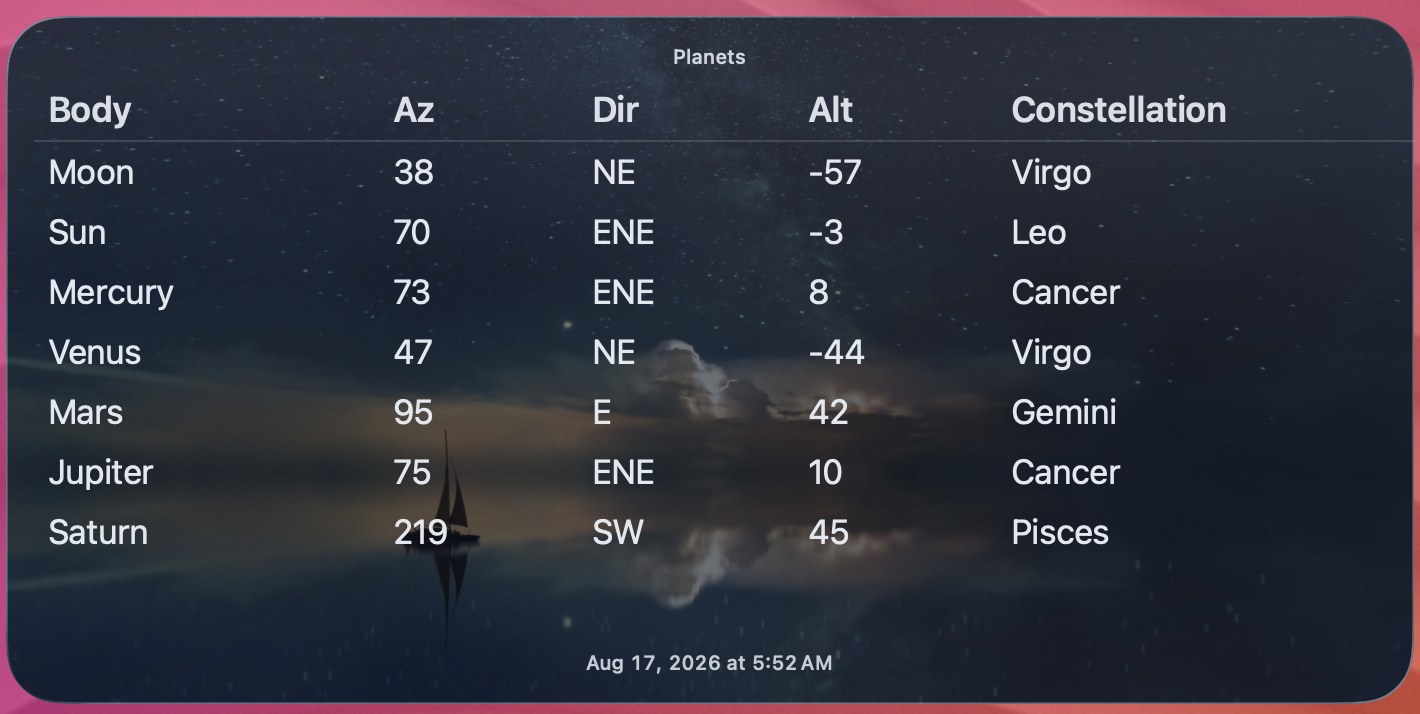
Planets Updated widget screenshot

Script

Planets Updated

by Brett Terpstra

This is based on a script by Dr. Drang, original recipe here. This version is designed to work with an Extra Large widget and adds table output and a background image.


Oringinal README

A Python script that lists the azimuth, altitude, and constellation for the Moon, Sun, Mercury, Venus, Mars, Jupiter, and Saturn. Example:

    Moon: 113 ESE  37 Leo
     Sun: 120 ESE  49 Leo
 Mercury: 133 SE   61 Cancer
   Venus: 101 E     6 Virgo
    Mars: 221 SW   68 Gemini
 Jupiter: 130 SE   58 Cancer
  Saturn: 274 W     0 Pisces

Requirements:

  • The Astropy module for Python.
  • The latitude and longitude of the location from which you’ll be viewing. These are entered in the script as the loc variable.
  • A TerminalWidget widget named planets.
  • Some means of running the script on a schedule, so your widget will be updated reasonably often. I used launchd to run the script every half-hour.

Script (planets-updated.py)

#!/usr/bin/env python3
# Original by Dr. Drang (https://leancrew.com)
import csv
import io

import astropy.units as u
from astropy.coordinates import AltAz, EarthLocation, get_body
from astropy.time import Time
from subprocess import run

def direction(az):
    """Return a string indication of the azimuth (given in degrees)."""

    dirs = "N NNE NE ENE E ESE SE SSE S SSW SW WSW W WNW NW NNW".split()
    i = int(((az + 11.25) % 360) / 22.5)
    return dirs[i]


# Current time in UTC.
ut = Time.now()

# Observation location.
# This is currently set to the Visitor Center at the Morton Arboretum in
# Lisle, Illinois, which is probably not where you'll be viewing the sky.
# Change the latitude and longitude to your viewing location. The values
# must be in decimal degrees followed by `*.u.deg`. The height parameter
# is optional.
loc = EarthLocation(lat=41.81433 * u.deg, lon=-88.07093 * u.deg, height=208 * u.m)

# Bodies of interest.
planets = "Moon Sun Mercury Venus Mars Jupiter Saturn".split()

# Current positions of all the bodies.
pos = {}
const = {}
for p in planets:
    pos[p] = get_body(p, ut).transform_to(AltAz(obstime=ut, location=loc))
    const[p] = pos[p].get_constellation()

rows = [["Body", "Az", "Dir", "Alt", "Constellation"]]
for p in planets:
    rows.append(
        [
            p,
            f"{pos[p].az.value:.0f}",
            direction(pos[p].az.value),
            f"{pos[p].alt.value:.0f}",
            const[p],
        ]
    )

buf = io.StringIO()
csv.writer(buf).writerows(rows)
table_csv = buf.getvalue()

# Pipe the results through TerminalWidget. The widget that gets the results
# must be named "planets."
BACKGROUND_IMAGE = (
    "https://images.unsplash.com/photo-1534447677768-be436bb09401"
    "?q=80&w=3294&auto=format&fit=crop&ixlib=rb-4.1.0"
    "&ixid=M3wxMjA3fDB8MHxwaG90by1wYWdlfHx8fGVufDB8fHx8fA%3D%3D"
)

run(
    [
        "/opt/homebrew/bin/terminal-widget",
        "--target",
        "planets",
        "--table",
        "-",
        "--grid",
        "none",
        "--table-layout",
        "auto",
        "--bg",
        "0b1220",
        "--fg",
        "e2e8f0",
        "--filter",
        "alpha:40",
        "--background-image",
        BACKGROUND_IMAGE,
        "--title",
        "Planets",
        "--timestamp",
    ],
    input=table_csv.encode(),
    check=False,
)
# To send the output to a terminal instead of TerminalWidget, comment the
# command above and uncomment the line below. This may aid in debugging.
# print(table_csv, end="")

Download script

Running in the background with launchd

Suggested interval: 30 minutes (StartInterval = 1800 seconds).

Save the script from this recipe to ~/bin/planets-updated.sh, then create a Launch Agent plist:

<?xml version="1.0" encoding="UTF-8"?>
<!DOCTYPE plist PUBLIC "-//Apple//DTD PLIST 1.0//EN" "http://www.apple.com/DTDs/PropertyList-1.0.dtd">
<plist version="1.0">
<dict>
  <key>Label</key>
  <string>com.terminalwidget.planets-updated</string>
  <key>ProgramArguments</key>
  <array>
    <string>/bin/bash</string>
    <string>~/bin/planets-updated.sh</string>
  </array>
  <key>RunAtLoad</key>
  <true/>
  <key>StartInterval</key>
  <integer>1800</integer>
  <key>StandardOutPath</key>
  <string>/tmp/com.terminalwidget.planets-updated.log</string>
  <key>StandardErrorPath</key>
  <string>/tmp/com.terminalwidget.planets-updated.err</string>
</dict>
</plist>

From Terminal:

mkdir -p ~/bin ~/Library/LaunchAgents
# Save your script to ~/bin/planets-updated.sh
cat > ~/Library/LaunchAgents/com.terminalwidget.planets-updated.plist <<'EOF'
<?xml version="1.0" encoding="UTF-8"?>
<!DOCTYPE plist PUBLIC "-//Apple//DTD PLIST 1.0//EN" "http://www.apple.com/DTDs/PropertyList-1.0.dtd">
<plist version="1.0">
<dict>
  <key>Label</key>
  <string>com.terminalwidget.planets-updated</string>
  <key>ProgramArguments</key>
  <array>
    <string>/bin/bash</string>
    <string>~/bin/planets-updated.sh</string>
  </array>
  <key>RunAtLoad</key>
  <true/>
  <key>StartInterval</key>
  <integer>1800</integer>
  <key>StandardOutPath</key>
  <string>/tmp/com.terminalwidget.planets-updated.log</string>
  <key>StandardErrorPath</key>
  <string>/tmp/com.terminalwidget.planets-updated.err</string>
</dict>
</plist>
EOF
launchctl bootstrap "gui/$(id -u)" ~/Library/LaunchAgents/com.terminalwidget.planets-updated.plist

For a GUI editor and troubleshooting, see LaunchControl from soma-zone.

← All recipes